

AutoCAD is one of the most popular CAD applications used in various engineering fields. If you are thinking about learning AutoCAD, you are in the right place.
In this article, we will discuss the definition, functions, advantages, and limitations of AutoCAD.
A. What is AutoCAD?
AutoCAD is a CAD (Computer-Aided Design) application created and developed by the multinational company, Autodesk.
The main function of AutoCAD is to help engineers and designers create technical drawings and designs faster and with greater precision.
With AutoCAD, engineers no longer need to create drawings manually on physical paper using pencils and rulers. AutoCAD provides various tools for creating design drawings.
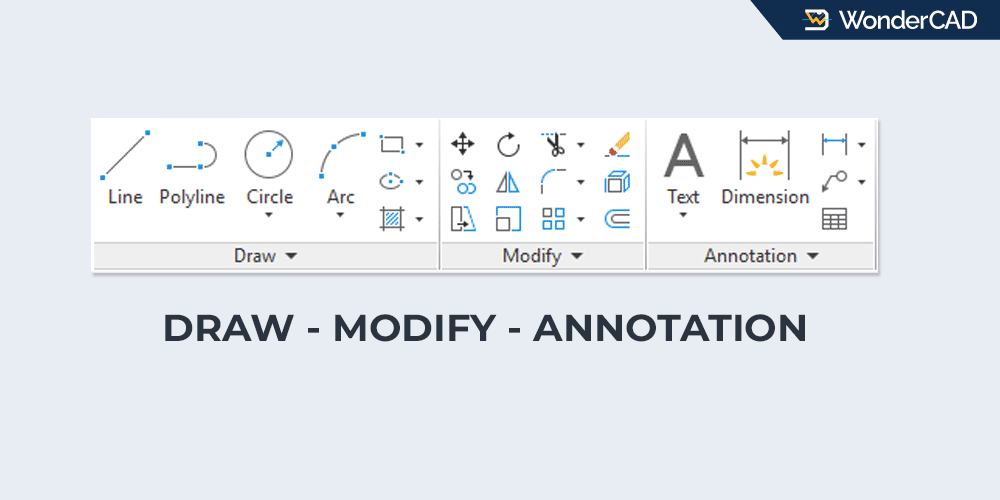
However, AutoCAD is just an application that provides tools. For example, if we need a line, AutoCAD provides the LINE command to create it. If we want to create a circle, AutoCAD provides the CIRCLE command.
For line weight, line types, and several other settings, we still need to determine them manually.
As we know, there are many rules in engineering drawings. Different line types have different meanings. Therefore, to create engineering drawings properly using AutoCAD, we still need to learn the rules of engineering drawing.
B. Advantages of AutoCAD
As one of the most popular CAD applications, AutoCAD certainly has many advantages. Here are some of them:
1. AutoCAD can be used to create 2D and 3D designs
The first advantage of AutoCAD is that it can be used to create both 2D and 3D designs.
For 2D design work, AutoCAD is considered one of the best applications available.
For 3D designs, AutoCAD’s features can be considered limited compared to some other CAD applications. However, it is still more than sufficient for creating simple 3D product designs.
If we create a design in 3D, we can easily project it into 2D views using the “View > Base” feature.
2. AutoCAD is used in almost all engineering-related fields
Another advantage of AutoCAD is that it is widely used in many fields related to technical and engineering drawings.
In the manufacturing industry, AutoCAD can be used to create designs for machine components, automotive engine components, and many other mechanical parts.
Meanwhile, in civil engineering, AutoCAD is commonly used to create building and construction drawings.
In addition, AutoCAD is also widely used for interior design and many other types of design projects.
3. The rendering results are very good
One of the advantages of AutoCAD that I really like is its ability to render 3D designs with very good visual results.
You can see an example of the rendering result in the image below:
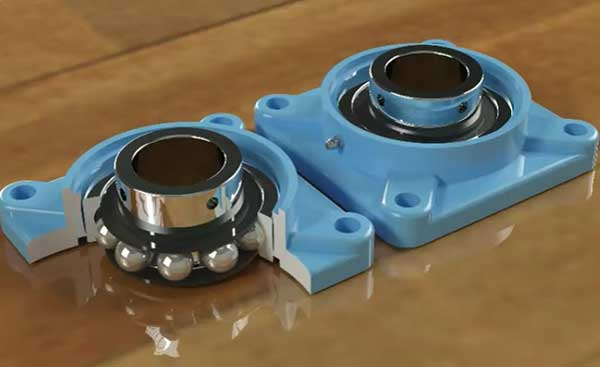
The image above is an example of a 3D block bearing rendering created in AutoCAD. It almost looks like a real block bearing, right?
To create renderings like that, the process is quite easy because AutoCAD provides many colors and material textures for rendering purposes, such as wood, stone, metal, and many others.
4. Good precision
Another advantage of AutoCAD is its high level of precision.
AutoCAD allows dimensions and coordinates to be displayed with high numerical precision, making it suitable for detailed engineering drawings.
This capability is more than sufficient for creating highly precise engineering designs. Even automotive engine components usually only require precision up to 3 decimal places.
5. Very wide workspace
AutoCAD has a very wide workspace. If we zoom in or out in the AutoCAD workspace, it almost seems endless.
With such a large workspace, we can create designs ranging from very small components to extremely large projects without any problems.
We can design small automotive components, office buildings, and even city layout plans in AutoCAD.
6. Many companies use AutoCAD
Another advantage of AutoCAD is that many companies use it.
In some industries, AutoCAD skills are even a mandatory requirement for job applicants.
Therefore, being able to use AutoCAD can be a significant advantage for us.
C. Limitations of AutoCAD
After discussing the advantages of AutoCAD, now let’s talk about some of its limitations.
These limitations are intentional because Autodesk provides more advanced features in other applications, such as Inventor.
Some of the limitations are:
1. Unable to create design simulations
AutoCAD is a CAD application, not a CAM or CAE application, so it cannot be used to create engineering simulations.
If we want to create simulations, Autodesk provides another application called Inventor.
2. Does not have a Design Tree
Some CAD applications provide a Design Tree feature that displays the history of the features used in a design.
Unfortunately, AutoCAD is not a feature-based CAD application, so it does not include a Design Tree for managing 3D models.
A Design Tree is a panel that records the sequence of features used to build a model and allows users to modify the parameters of earlier features. Any related features can then update automatically based on those changes.
3. Limited parametric features
AutoCAD includes basic parametric constraints, but it does not offer the same feature-based parametric workflow found in applications such as Inventor or SolidWorks.
I can somewhat understand this limitation because Autodesk has another product called Inventor, which is specifically designed for parametric 3D mechanical design and engineering simulations. Therefore, AutoCAD’s parametric capabilities may have been intentionally kept limited in this area.
4. The Software Is Relatively Expensive
AutoCAD is currently available only as a subscription service, with no perpetual license option. While AutoCAD offers many powerful features, its subscription cost may be considered relatively expensive, especially for individual users and small businesses.
For comparison, the cost of a one-year AutoCAD subscription can be enough to purchase a perpetual license for alternative CAD software with similar core functionality, such as ZWCAD, nanoCAD, and 4MCAD.
However, that may simply be the price to pay for software that has a proven track record of stability, is widely adopted across industries, and remains the market leader in this field.
Overall, AutoCAD remains one of the most popular CAD applications in the world. Its strengths in 2D drafting, industry adoption, and reliability make it an excellent choice for engineers, designers, and students. Although it has some limitations compared to modern parametric CAD software, AutoCAD is still a valuable skill that can open many career opportunities.

Leave a Reply